<?xml version="1.0" encoding="utf-8"?><feed xmlns="http://www.w3.org/2005/Atom" ><generator uri="https://jekyllrb.com/" version="3.10.0">Jekyll</generator><link href="https://mdislammazharul.github.io/feed.xml" rel="self" type="application/atom+xml" /><link href="https://mdislammazharul.github.io/" rel="alternate" type="text/html" /><updated>2025-12-30T22:50:19+00:00</updated><id>https://mdislammazharul.github.io/feed.xml</id><title type="html">Islam’s Homepage</title><subtitle>personal description</subtitle><author><name>Md Mazharul Islam</name><email>mazhar.cuetcse@gmail.com</email></author><entry><title type="html">🫁 Lung Cancer Detection: CNN → Hugging Face Space → React UI → CI/CD</title><link href="https://mdislammazharul.github.io/posts/2025-12-30-Full_Stack_Lung_Cancer_Detection.md/" rel="alternate" type="text/html" title="🫁 Lung Cancer Detection: CNN → Hugging Face Space → React UI → CI/CD" /><published>2025-12-30T00:00:00+00:00</published><updated>2025-12-30T00:00:00+00:00</updated><id>https://mdislammazharul.github.io/posts/Full_Stack_Lung_Cancer_Detection</id><content type="html" xml:base="https://mdislammazharul.github.io/posts/2025-12-30-Full_Stack_Lung_Cancer_Detection.md/"><![CDATA[<p>Lung cancer is one of the leading causes of cancer-related mortality worldwide. Early and accurate diagnosis plays a critical role in treatment planning and patient outcomes. Among the different diagnostic modalities, <strong>histopathological analysis of lung tissue</strong> remains a gold standard for confirming cancer type and subtype.</p>

<p>From a clinical perspective, lung cancer is commonly categorized into multiple histological subtypes. In this project, the focus is on three clinically relevant categories:</p>

<ul>
  <li><strong>Normal lung tissue (<code class="language-plaintext highlighter-rouge">lung_n</code>)</strong></li>
  <li><strong>Lung adenocarcinoma (<code class="language-plaintext highlighter-rouge">lung_aca</code>)</strong></li>
  <li><strong>Lung squamous cell carcinoma (<code class="language-plaintext highlighter-rouge">lung_scc</code>)</strong></li>
</ul>

<p><img src="/images/lung_cancer.webp" alt="Lung Cancer" /></p>

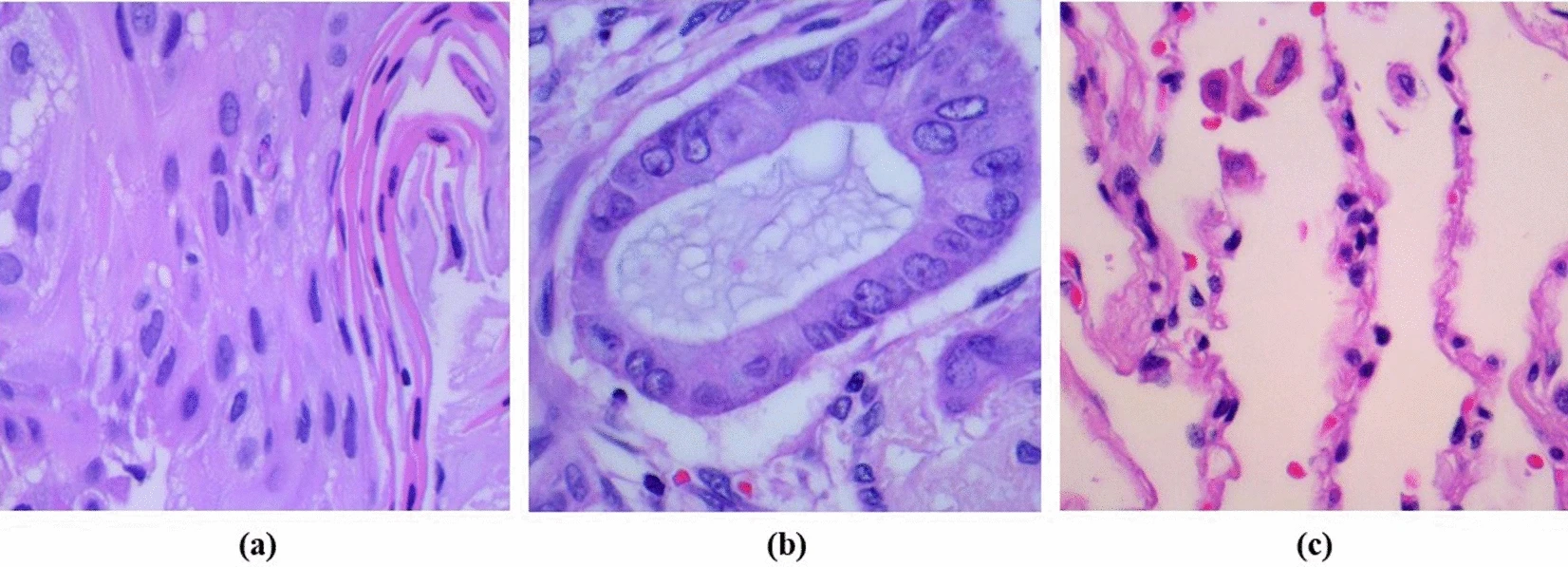
<p>(a) representing lung <strong>adenocarcinoma</strong>, <br />
(b) showing <strong>lung squamous cell carcinoma</strong>, <br />
(c) depicting <strong>normal cells</strong>.</p>

<p>Adenocarcinoma and squamous cell carcinoma are two major forms of non-small cell lung cancer (NSCLC), each associated with different growth patterns, treatment strategies, and prognostic implications. Distinguishing between these subtypes using histopathology images requires careful analysis of <strong>cellular morphology, tissue architecture, and staining patterns</strong>, which can be subtle and highly variable.</p>

<p>Ref: <a href="https://doi.org/10.1038/s41598-024-61101-7">Precise and automated lung cancer cell classification using deep neural network with multiscale features and model distillation</a></p>

<hr />

<h2 id="why-convolutional-neural-networks-cnns">Why Convolutional Neural Networks (CNNs)?</h2>

<p>Histopathology images are high-dimensional and spatially complex. Traditional machine learning approaches require handcrafted features, which often fail to generalize across staining variations and tissue heterogeneity.</p>

<p><strong>Convolutional Neural Networks (CNNs)</strong> are well-suited for this task because they:</p>

<ul>
  <li>Learn hierarchical visual features directly from raw images</li>
  <li>Capture local textures (e.g., nuclei shape, gland structure) and global morphology</li>
  <li>Are robust to small spatial variations through pooling operations</li>
</ul>

<p>Early convolutional layers typically learn low-level patterns such as edges and color gradients, while deeper layers capture higher-level morphological features that differentiate cancer subtypes.</p>

<hr />

<h2 id="problem-formulation">Problem formulation</h2>

<p>From a machine learning perspective, this task is formulated as a <strong>multi-class image classification problem</strong>:</p>

<ul>
  <li><strong>Input:</strong> RGB histopathology image of lung tissue</li>
  <li><strong>Output:</strong> One of three class labels (<code class="language-plaintext highlighter-rouge">lung_n</code>, <code class="language-plaintext highlighter-rouge">lung_aca</code>, <code class="language-plaintext highlighter-rouge">lung_scc</code>) with associated probabilities</li>
</ul>

<p>Performance evaluation goes beyond overall accuracy. In medical settings, <strong>class-wise recall (sensitivity)</strong> and <strong>false negative rate (FNR)</strong> are particularly important, as missed cancer cases can have serious clinical consequences.</p>

<hr />

<h2 id="motivation-for-an-end-to-end-system">Motivation for an end-to-end system</h2>

<p>Many academic projects stop at model training and offline evaluation. However, deploying a trained medical imaging model introduces additional challenges:</p>

<ul>
  <li>Large model artifacts (often &gt;100 MB)</li>
  <li>Reproducible inference environments</li>
  <li>Safe and consistent preprocessing</li>
  <li>Practical access through APIs or user interfaces</li>
</ul>

<p>The goal of this project is not only to train a CNN, but to <strong>build a complete, reproducible, end-to-end system</strong> that takes a histopathology image as input and produces a clinically interpretable prediction through a live web interface.</p>

<p>The sections that follow document this process step by step—from dataset preparation and model training to deployment, containerization, and frontend integration—so the same workflow can be reused for similar medical imaging applications.</p>

<hr />

<h2 id="system-overview">System overview</h2>

<p>The system consists of the following components:</p>

<ul>
  <li>A <strong>CNN-based image classifier</strong> trained with TensorFlow/Keras</li>
  <li><strong>Saved model artifacts</strong> (&gt;100 MB)</li>
  <li>A <strong>FastAPI inference service</strong></li>
  <li>A <strong>Gradio-based Hugging Face Space</strong> for free model hosting</li>
  <li>A <strong>React frontend</strong> built with Vite and Tailwind CSS</li>
  <li><strong>Docker</strong> for reproducible backend deployment</li>
  <li><strong>GitHub Actions</strong> for automated builds and deployment</li>
</ul>

<hr />

<h2 id="high-level-architecture">High-level architecture</h2>

<p>The final setup supports two inference paths:</p>

<ol>
  <li>
    <p><strong>Hugging Face Space inference</strong></p>

    <ul>
      <li>The trained model is hosted on the Hugging Face Hub</li>
      <li>A Gradio app loads the model and exposes a prediction function</li>
      <li>The frontend sends images directly to the Space</li>
    </ul>
  </li>
  <li>
    <p><strong>FastAPI inference</strong></p>

    <ul>
      <li>A REST API loads the same trained model</li>
      <li>Exposes <code class="language-plaintext highlighter-rouge">/predict</code> and <code class="language-plaintext highlighter-rouge">/health</code> endpoints</li>
      <li>Can be run locally or inside Docker</li>
    </ul>
  </li>
</ol>

<p>This dual approach allows:</p>

<ul>
  <li>free public inference without hosting a server</li>
  <li>a clean API implementation for local testing and containerization</li>
</ul>

<hr />

<h2 id="1-starting-point-define-the-goal-and-freeze-the-dataset-layout">1) Starting point: define the goal and freeze the dataset layout</h2>

<p>I began with one clear objective: <strong>classify lung histopathology images into 3 classes</strong>:</p>

<ul>
  <li><code class="language-plaintext highlighter-rouge">lung_n</code> (normal)</li>
  <li><code class="language-plaintext highlighter-rouge">lung_aca</code> (adenocarcinoma)</li>
  <li><code class="language-plaintext highlighter-rouge">lung_scc</code> (squamous cell carcinoma)</li>
</ul>

<p>The first practical step was ensuring a stable dataset layout that my training and inference code could rely on:</p>

<div class="language-plaintext highlighter-rouge"><div class="highlight"><pre class="highlight"><code>data/raw/lung_colon_image_set/lung_image_sets/
  lung_aca/
  lung_n/
  lung_scc/
</code></pre></div></div>

<p>This folder naming is important because later:</p>

<ul>
  <li>training maps folders → class indices</li>
  <li>inference uses <code class="language-plaintext highlighter-rouge">classes.json</code> to map indices → labels</li>
</ul>

<p>Kaggle Dataset Link: <a href="https://www.kaggle.com/datasets/andrewmvd/lung-and-colon-cancer-histopathological-images">Lung and Colon Cancer Histopathological Images</a></p>

<p>Typical setup commands:</p>

<div class="language-bash highlighter-rouge"><div class="highlight"><pre class="highlight"><code><span class="nb">mkdir</span> <span class="nt">-p</span> data/raw
unzip lung_colon_image_set.zip <span class="nt">-d</span> data/raw/lung_colon_image_set
</code></pre></div></div>

<hr />

<h2 id="2-phase-1--train-the-cnn-model-only-ml-first">2) Phase 1 — Train the CNN model (only ML first)</h2>

<p>I trained the CNN using the scripts under <code class="language-plaintext highlighter-rouge">src/lung_cancer/</code>:</p>

<ul>
  <li><code class="language-plaintext highlighter-rouge">dataset.py</code> (load + preprocess)</li>
  <li><code class="language-plaintext highlighter-rouge">model.py</code> (CNN architecture)</li>
  <li><code class="language-plaintext highlighter-rouge">train.py</code> (training loop)</li>
  <li><code class="language-plaintext highlighter-rouge">evaluate.py</code> (classification report)</li>
</ul>

<p>Run training (from repo root):</p>

<div class="language-bash highlighter-rouge"><div class="highlight"><pre class="highlight"><code>python <span class="nt">-m</span> src.lung_cancer.train
</code></pre></div></div>

<p>Run evaluation:</p>

<div class="language-bash highlighter-rouge"><div class="highlight"><pre class="highlight"><code>python <span class="nt">-m</span> src.lung_cancer.evaluate
</code></pre></div></div>

<p>The training output is versioned under:</p>

<div class="language-plaintext highlighter-rouge"><div class="highlight"><pre class="highlight"><code>artifacts/models/v1/
  lung_cnn.keras
  classes.json
  metadata.json
artifacts/reports/
  classification_report.txt
</code></pre></div></div>

<p>This artifact layout is what the FastAPI backend loads later.</p>

<hr />

<h2 id="3-phase-2--test-the-trained-model-through-fastapi">3) Phase 2 — Test the trained model through FastAPI</h2>

<p>Before building a UI, I validated inference through an API.</p>

<p>Your backend is in <code class="language-plaintext highlighter-rouge">backend/</code> and exposes:</p>

<ul>
  <li><code class="language-plaintext highlighter-rouge">GET /health</code></li>
  <li><code class="language-plaintext highlighter-rouge">POST /predict</code> (multipart image upload)</li>
</ul>

<p>It loads model artifacts at startup using <code class="language-plaintext highlighter-rouge">ensure_model_files()</code> and creates <code class="language-plaintext highlighter-rouge">LungCancerPredictor</code>.</p>

<h3 id="run-fastapi-locally">Run FastAPI locally</h3>

<div class="language-bash highlighter-rouge"><div class="highlight"><pre class="highlight"><code>pip <span class="nb">install</span> <span class="nt">-r</span> backend/requirements-backend.txt
uvicorn backend.main:app <span class="nt">--host</span> 0.0.0.0 <span class="nt">--port</span> 8000
</code></pre></div></div>

<p>Health check:</p>

<div class="language-bash highlighter-rouge"><div class="highlight"><pre class="highlight"><code>curl http://localhost:8000/health
</code></pre></div></div>

<p>Predict using an image:</p>

<div class="language-bash highlighter-rouge"><div class="highlight"><pre class="highlight"><code>curl <span class="nt">-X</span> POST <span class="s2">"http://localhost:8000/predict"</span> <span class="se">\</span>
  <span class="nt">-F</span> <span class="s2">"file=@data/sample_requests/example.png"</span>
</code></pre></div></div>

<p>At this point, I had an end-to-end system working locally:
<strong>image → API → model → JSON response</strong>.</p>

<hr />

<h2 id="4-phase-3--dockerize-the-backend">4) Phase 3 — Dockerize the backend</h2>

<p>Next, I containerized the backend using the repo <code class="language-plaintext highlighter-rouge">Dockerfile</code>.</p>

<p>Key details:</p>

<ul>
  <li>CPU-only inference is enforced via <code class="language-plaintext highlighter-rouge">CUDA_VISIBLE_DEVICES=-1</code></li>
  <li>backend dependencies come from <code class="language-plaintext highlighter-rouge">backend/requirements-backend.txt</code></li>
  <li>code is copied from <code class="language-plaintext highlighter-rouge">src/</code> and <code class="language-plaintext highlighter-rouge">backend/</code></li>
  <li>Uvicorn is the container entrypoint</li>
</ul>

<h3 id="build-and-run-locally">Build and run locally</h3>

<div class="language-bash highlighter-rouge"><div class="highlight"><pre class="highlight"><code>docker build <span class="nt">-t</span> lung-cancer-api <span class="nb">.</span>
docker run <span class="nt">--rm</span> <span class="nt">-p</span> 8000:8000 lung-cancer-api
</code></pre></div></div>

<p>Test:</p>

<div class="language-bash highlighter-rouge"><div class="highlight"><pre class="highlight"><code>curl http://localhost:8000/health
</code></pre></div></div>

<hr />

<h2 id="5-phase-4--push-the-docker-image-to-docker-hub-pull-and-run-workflow">5) Phase 4 — Push the Docker image to Docker Hub (pull-and-run workflow)</h2>

<p>Once Docker worked locally, I published it so anyone can run:</p>

<h3 id="login">Login</h3>

<div class="language-bash highlighter-rouge"><div class="highlight"><pre class="highlight"><code>docker login
</code></pre></div></div>

<h3 id="tag-the-image">Tag the image</h3>

<div class="language-bash highlighter-rouge"><div class="highlight"><pre class="highlight"><code>docker tag lung-cancer-api:latest mdislammazharul/lung-cancer-api:latest
</code></pre></div></div>

<h3 id="push">Push</h3>

<div class="language-bash highlighter-rouge"><div class="highlight"><pre class="highlight"><code>docker push mdislammazharul/lung-cancer-api:latest
</code></pre></div></div>

<h3 id="anyone-can-now-pull-and-run-it">Anyone can now pull and run it</h3>

<div class="language-bash highlighter-rouge"><div class="highlight"><pre class="highlight"><code>docker pull mdislammazharul/lung-cancer-api:latest

docker run <span class="nt">--rm</span> <span class="nt">-p</span> 8000:8000 <span class="se">\</span>
  <span class="nt">-e</span> <span class="nv">ALLOWED_ORIGINS</span><span class="o">=</span><span class="s2">"*"</span> <span class="se">\</span>
  mdislammazharul/lung-cancer-api:latest
</code></pre></div></div>

<p>This gives a clean “one command to run inference locally” workflow.</p>

<hr />

<h2 id="6-phase-5--handle-the-100mb-model-file">6) Phase 5 — Handle the &gt;100MB model file</h2>

<p>After training, the model was <strong>&gt;100MB</strong>, which created problems when I tried to push it normally to GitHub.</p>

<p>So I used two strategies (both useful depending on the situation):</p>

<h3 id="option-a-github-with-git-lfs">Option A: GitHub with Git LFS</h3>

<p>One-time setup:</p>

<div class="language-bash highlighter-rouge"><div class="highlight"><pre class="highlight"><code>git lfs <span class="nb">install</span>
</code></pre></div></div>

<p>Track model files:</p>

<div class="language-bash highlighter-rouge"><div class="highlight"><pre class="highlight"><code>git lfs track <span class="s2">"*.h5"</span>
git lfs track <span class="s2">"*.keras"</span>
</code></pre></div></div>

<p>Commit + push:</p>

<div class="language-bash highlighter-rouge"><div class="highlight"><pre class="highlight"><code>git add .gitattributes
git add artifacts/models/v1/lung_cnn.keras
git commit <span class="nt">-m</span> <span class="s2">"Track model with Git LFS"</span>
git push origin main
</code></pre></div></div>

<h3 id="option-b-hugging-face-hub-best-for-free-deployment">Option B: Hugging Face Hub (best for free deployment)</h3>

<p>This project’s Hugging Face Space downloads the model from the Hub at runtime using <code class="language-plaintext highlighter-rouge">hf_hub_download(...)</code>.</p>

<p>Install and login:</p>

<div class="language-bash highlighter-rouge"><div class="highlight"><pre class="highlight"><code>pip <span class="nb">install</span> <span class="nt">-U</span> huggingface_hub
huggingface-cli login
</code></pre></div></div>

<p>Clone your HF model repo:</p>

<div class="language-bash highlighter-rouge"><div class="highlight"><pre class="highlight"><code>git clone https://huggingface.co/mdislammazharul/Lung_Cancer_Detection
<span class="nb">cd </span>Lung_Cancer_Detection
</code></pre></div></div>

<p>Copy artifacts in:</p>

<div class="language-bash highlighter-rouge"><div class="highlight"><pre class="highlight"><code><span class="nb">cp</span> /path/to/lung_cnn.h5 <span class="nb">.</span>
<span class="nb">cp</span> /path/to/classes.json <span class="nb">.</span>
</code></pre></div></div>

<p>Commit + push:</p>

<div class="language-bash highlighter-rouge"><div class="highlight"><pre class="highlight"><code>git add <span class="nb">.</span>
git commit <span class="nt">-m</span> <span class="s2">"Upload trained model + classes mapping"</span>
git push
</code></pre></div></div>

<hr />

<h2 id="7-phase-6--deploy-inference-on-hugging-face-spaces-gradio">7) Phase 6 — Deploy inference on Hugging Face Spaces (Gradio)</h2>

<p>After the model artifacts were hosted, I deployed a free public inference app using Gradio.</p>

<p>The Space app (<code class="language-plaintext highlighter-rouge">Lung_Cancer_Detection_HF_Space/app.py</code>) does this:</p>

<ul>
  <li>Forces CPU inference</li>
  <li>Downloads model + <code class="language-plaintext highlighter-rouge">classes.json</code> from HF Hub</li>
  <li>Loads the model with a compatibility patch (<code class="language-plaintext highlighter-rouge">DenseCompat</code>)</li>
  <li>Runs preprocessing (OpenCV resize, normalize)</li>
  <li>Returns JSON probabilities + <code class="language-plaintext highlighter-rouge">predicted_class</code></li>
</ul>

<h3 id="space-deployment-steps">Space deployment steps</h3>

<ol>
  <li>Create a new Space on Hugging Face (Gradio)</li>
  <li>Upload/push the contents of:</li>
</ol>

<div class="language-plaintext highlighter-rouge"><div class="highlight"><pre class="highlight"><code>Lung_Cancer_Detection_HF_Space/
  app.py
  requirements.txt
</code></pre></div></div>

<p>Now the model is usable publicly without shipping the &gt;100MB file inside the Space repo.</p>

<hr />

<h2 id="8-phase-7--connect-via-gradio-api-frontend-independent-testing">8) Phase 7 — Connect via Gradio API (frontend-independent testing)</h2>

<p>Before building the React UI, I confirmed I could call the Space programmatically.</p>

<div class="language-bash highlighter-rouge"><div class="highlight"><pre class="highlight"><code>pip <span class="nb">install </span>gradio_client
</code></pre></div></div>

<div class="language-python highlighter-rouge"><div class="highlight"><pre class="highlight"><code><span class="kn">from</span> <span class="nn">gradio_client</span> <span class="kn">import</span> <span class="n">Client</span>

<span class="n">client</span> <span class="o">=</span> <span class="n">Client</span><span class="p">(</span><span class="s">"mdislammazharul/lung-cancer-detection-hf-space"</span><span class="p">)</span>
<span class="n">result</span> <span class="o">=</span> <span class="n">client</span><span class="p">.</span><span class="n">predict</span><span class="p">(</span><span class="s">"data/sample_requests/example.png"</span><span class="p">,</span> <span class="n">fn_index</span><span class="o">=</span><span class="mi">2</span><span class="p">)</span>
<span class="k">print</span><span class="p">(</span><span class="n">result</span><span class="p">)</span>
</code></pre></div></div>

<hr />

<h2 id="9-phase-8--build-the-react-frontend">9) Phase 8 — Build the React frontend</h2>

<p>Only after inference was stable (FastAPI + Space), I started to build the UI.</p>

<p>Frontend structure:</p>

<ul>
  <li><code class="language-plaintext highlighter-rouge">frontend/</code> (Vite + React)</li>
  <li>Tailwind styling</li>
  <li>Components like <code class="language-plaintext highlighter-rouge">ModelArchitecture.jsx</code>, <code class="language-plaintext highlighter-rouge">ModelPerformance.jsx</code>, <code class="language-plaintext highlighter-rouge">PredictionResult.jsx</code></li>
  <li>API client: <code class="language-plaintext highlighter-rouge">frontend/src/lungSpaceApi.js</code> (can target local FastAPI or HF Space)</li>
</ul>

<p>Run locally:</p>

<div class="language-bash highlighter-rouge"><div class="highlight"><pre class="highlight"><code><span class="nb">cd </span>frontend
npm ci
npm run dev
</code></pre></div></div>

<p>At this stage I could:</p>

<ul>
  <li>upload an image</li>
  <li>get predictions</li>
  <li>show metrics and model details on the same site</li>
</ul>

<hr />

<h2 id="10-phase-9--cicd-with-github-actions">10) Phase 9 — CI/CD with GitHub Actions</h2>

<p>After everything worked locally, I automated:</p>

<h3 id="a-ci-backend-import-smoke-test">A) CI: backend import smoke test</h3>

<p>The <code class="language-plaintext highlighter-rouge">ci.yml</code> checks that the backend imports cleanly:</p>

<div class="language-bash highlighter-rouge"><div class="highlight"><pre class="highlight"><code>python <span class="nt">-c</span> <span class="s2">"from backend.main import app; print('FastAPI import OK')"</span>
</code></pre></div></div>

<p>This is a lightweight sanity check that catches broken imports early.</p>

<h3 id="b-deploy-frontend-to-github-pages">B) Deploy frontend to GitHub Pages</h3>

<p>The <code class="language-plaintext highlighter-rouge">pages.yml</code> builds the frontend and deploys it to Pages. It also runs a backend import test with <code class="language-plaintext highlighter-rouge">SKIP_MODEL_LOAD=1</code> so the workflow doesn’t require model artifacts during the Pages build step.</p>

<hr />

<h1 id="summary">Summary</h1>

<p>This project demonstrates the full lifecycle of a medical imaging application, starting from dataset preparation and CNN model training and progressing through inference validation, large-model artifact handling, deployment on free cloud infrastructure, containerization, frontend development, and automated CI/CD.</p>

<ol>
  <li>Dataset folder structure</li>
  <li>Train model → save <code class="language-plaintext highlighter-rouge">artifacts/models/v1/*</code></li>
  <li>Evaluate → save report</li>
  <li>FastAPI inference locally + curl tests</li>
  <li>Dockerize FastAPI → test container locally</li>
  <li>Push Docker image to Docker Hub</li>
  <li>Upload large model to HF Hub (or Git LFS)</li>
  <li>Deploy HF Space (Gradio) that downloads model at runtime</li>
  <li>Test Gradio API programmatically</li>
  <li>Build React frontend</li>
  <li>Add CI/CD (CI + Pages deploy)</li>
</ol>

<p>Github: <a href="https://github.com/mdislammazharul/Lung_Cancer_Detection">https://github.com/mdislammazharul/Lung_Cancer_Detection</a></p>

<p>Live Site: <a href="https://mdislammazharul.github.io/Lung_Cancer_Detection/">https://mdislammazharul.github.io/Lung_Cancer_Detection/</a></p>

<hr />]]></content><author><name>Md Mazharul Islam</name><email>mazhar.cuetcse@gmail.com</email></author><category term="Deep Learning" /><category term="FastAPI" /><category term="Docker" /><category term="React" /><category term="CI/CD" /><category term="HuggingFace" /><category term="Gradio" /><summary type="html"><![CDATA[Lung cancer is one of the leading causes of cancer-related mortality worldwide. Early and accurate diagnosis plays a critical role in treatment planning and patient outcomes. Among the different diagnostic modalities, histopathological analysis of lung tissue remains a gold standard for confirming cancer type and subtype.]]></summary></entry><entry><title type="html">🫀 Building a Full-Stack Heart Disease Prediction System: ML, FastAPI, Docker, React, Render, GitHub Pages, and CI/CD</title><link href="https://mdislammazharul.github.io/posts/2025-11-23-Full-Stack_Heart_Disease_Prediction_System.md/" rel="alternate" type="text/html" title="🫀 Building a Full-Stack Heart Disease Prediction System: ML, FastAPI, Docker, React, Render, GitHub Pages, and CI/CD" /><published>2025-11-23T00:00:00+00:00</published><updated>2025-11-23T00:00:00+00:00</updated><id>https://mdislammazharul.github.io/posts/Full-Stack_Heart_Disease_Prediction_System</id><content type="html" xml:base="https://mdislammazharul.github.io/posts/2025-11-23-Full-Stack_Heart_Disease_Prediction_System.md/"><![CDATA[<p>In this project, I built a <strong>complete end-to-end AI application</strong> that predicts the risk of <strong>heart failure</strong> using real clinical data. The goal was not just to train a machine learning model, but to <strong>transform it into a full-stack production-grade web application</strong>, deploy it using modern DevOps tools, and make it publicly available.</p>

<p>This system includes:</p>

<table>
  <thead>
    <tr>
      <th>Layer</th>
      <th>Technology</th>
    </tr>
  </thead>
  <tbody>
    <tr>
      <td>ML Training</td>
      <td>Python, Scikit-Learn, Matplotlib, Pandas</td>
    </tr>
    <tr>
      <td>Backend API</td>
      <td>FastAPI + Uvicorn</td>
    </tr>
    <tr>
      <td>Model Serving</td>
      <td>Pickle + Docker</td>
    </tr>
    <tr>
      <td>Deployment (API)</td>
      <td>Render (Docker)</td>
    </tr>
    <tr>
      <td>Frontend</td>
      <td>React + Vite + Tailwind</td>
    </tr>
    <tr>
      <td>Hosting (Frontend)</td>
      <td>GitHub Pages</td>
    </tr>
    <tr>
      <td>CI/CD</td>
      <td>GitHub Actions</td>
    </tr>
    <tr>
      <td>Communication</td>
      <td>REST API (JSON)</td>
    </tr>
  </tbody>
</table>

<h1 id="-system-architecture">🧠 System Architecture</h1>

<div class="language-plaintext highlighter-rouge"><div class="highlight"><pre class="highlight"><code>                        ┌────────────────────────────┐
                        │    Machine Learning (ML)   │
                        │  Model training + Pickle   │
                        │  Python, Scikit-learn      │
                        └─────────────┬──────────────┘
                                      │
                              Model.pkl exported
                                      │
                        ┌─────────────▼──────────────┐
                        │  FastAPI Backend (Render)  │
                        │ /predict endpoint (JSON)   │
                        │ Dockerized model serving   │
                        └─────────────┬──────────────┘
                                      │
                                  REST API
                                      │
                     ┌────────────────▼────────────────┐
                     │        React Frontend           │
                     │   Hosted on GitHub Pages        │
                     │   Form → API → Prediction       │
                     └────────────────┬────────────────┘
                                      │
                                      │
                        ┌─────────────▼──────────────┐
                        │    End Users (Browser)     │
                        │ Web Interface for Testing  │
                        └────────────────────────────┘
</code></pre></div></div>

<hr />

<h1 id="-file-structure">📂 File Structure</h1>

<div class="language-plaintext highlighter-rouge"><div class="highlight"><pre class="highlight"><code>Heart_Disease/
│── .python-version
│── Dockerfile
│── pyproject.toml / requirements.txt
│── uv.lock
│
│── heart_failure_clinical_records_dataset.csv
│── heart_failure_model.pkl
│── Mid_Term_Project.py       # Training Script
│── Mid_Term_Project.ipynb    # EDA Notebook
│── export_artifacts.py       # JSON/Graph exporting
│── main.py                   # FastAPI backend
│
├── figures/
│   ├── correlation_matrix.png
│   ├── histograms.png
│   ├── death_event.png
│
├── heart-disease-app/        # FRONTEND (React+Vite)
│   ├── public/
│   ├── src/
│   │   ├── components/
│   │   │   ├── DataHead.jsx
│   │   │   ├── EDAGallery.jsx
│   │   │   ├── ModelSummary.jsx
│   │   ├── App.jsx
│   │   ├── main.jsx
│   │   ├── index.css
│   ├── package.json
│   ├── vite.config.js
│   ├── tailwind.config.js
│   ├── postcss.config.js
│
└── .github/
    └── workflows/
        └── deploy.yml        # CI/CD GitHub Actions
</code></pre></div></div>

<hr />

<h1 id="️-phase-1-machine-learning-model-development">⚙️ Phase 1: Machine Learning Model Development</h1>

<h3 id="-install-dependencies">📥 Install Dependencies</h3>

<div class="language-bash highlighter-rouge"><div class="highlight"><pre class="highlight"><code>pip <span class="nb">install </span>pandas numpy scikit-learn matplotlib seaborn
</code></pre></div></div>

<h3 id="-load-dataset--explore">🧪 Load Dataset &amp; Explore</h3>

<div class="language-python highlighter-rouge"><div class="highlight"><pre class="highlight"><code><span class="kn">import</span> <span class="nn">pandas</span> <span class="k">as</span> <span class="n">pd</span>
<span class="n">df</span> <span class="o">=</span> <span class="n">pd</span><span class="p">.</span><span class="n">read_csv</span><span class="p">(</span><span class="s">"heart_failure_clinical_records_dataset.csv"</span><span class="p">)</span>
<span class="k">print</span><span class="p">(</span><span class="n">df</span><span class="p">.</span><span class="n">head</span><span class="p">())</span>
<span class="n">df</span><span class="p">.</span><span class="n">info</span><span class="p">()</span>
<span class="n">df</span><span class="p">.</span><span class="n">describe</span><span class="p">()</span>
</code></pre></div></div>

<h3 id="-eda-visualizations">📊 EDA Visualizations</h3>

<div class="language-python highlighter-rouge"><div class="highlight"><pre class="highlight"><code><span class="kn">import</span> <span class="nn">seaborn</span> <span class="k">as</span> <span class="n">sns</span>
<span class="kn">import</span> <span class="nn">matplotlib.pyplot</span> <span class="k">as</span> <span class="n">plt</span>

<span class="n">sns</span><span class="p">.</span><span class="n">heatmap</span><span class="p">(</span><span class="n">df</span><span class="p">.</span><span class="n">corr</span><span class="p">(),</span> <span class="n">annot</span><span class="o">=</span><span class="bp">True</span><span class="p">)</span>
<span class="n">plt</span><span class="p">.</span><span class="n">savefig</span><span class="p">(</span><span class="s">'figures/correlation_matrix.png'</span><span class="p">)</span>
</code></pre></div></div>

<h3 id="-model-training">🤖 Model Training</h3>

<div class="language-bash highlighter-rouge"><div class="highlight"><pre class="highlight"><code>python Mid_Term_Project.py
</code></pre></div></div>

<p>Inside <code class="language-plaintext highlighter-rouge">Mid_Term_Project.py</code>:</p>

<ul>
  <li>Model training</li>
  <li>Cross-validation</li>
  <li>Hyperparameter tuning</li>
  <li>Save best model:</li>
</ul>

<div class="language-python highlighter-rouge"><div class="highlight"><pre class="highlight"><code><span class="kn">import</span> <span class="nn">pickle</span>
<span class="n">pickle</span><span class="p">.</span><span class="n">dump</span><span class="p">(</span><span class="n">best_model</span><span class="p">,</span> <span class="nb">open</span><span class="p">(</span><span class="s">"heart_failure_model.pkl"</span><span class="p">,</span> <span class="s">"wb"</span><span class="p">))</span>
</code></pre></div></div>

<hr />

<h1 id="-phase-2-fastapi-backend">🌐 Phase 2: FastAPI Backend</h1>

<h3 id="-install-fastapi">📦 Install FastAPI</h3>

<div class="language-bash highlighter-rouge"><div class="highlight"><pre class="highlight"><code>pip <span class="nb">install </span>fastapi uvicorn pydantic gunicorn
</code></pre></div></div>

<h3 id="-create-api-mainpy">🚀 Create API (main.py)</h3>

<div class="language-python highlighter-rouge"><div class="highlight"><pre class="highlight"><code><span class="kn">from</span> <span class="nn">fastapi</span> <span class="kn">import</span> <span class="n">FastAPI</span>
<span class="kn">import</span> <span class="nn">pickle</span>
<span class="kn">import</span> <span class="nn">numpy</span> <span class="k">as</span> <span class="n">np</span>

<span class="n">app</span> <span class="o">=</span> <span class="n">FastAPI</span><span class="p">()</span>
<span class="n">model</span> <span class="o">=</span> <span class="n">pickle</span><span class="p">.</span><span class="n">load</span><span class="p">(</span><span class="nb">open</span><span class="p">(</span><span class="s">"heart_failure_model.pkl"</span><span class="p">,</span> <span class="s">"rb"</span><span class="p">))</span>

<span class="o">@</span><span class="n">app</span><span class="p">.</span><span class="n">post</span><span class="p">(</span><span class="s">"/predict"</span><span class="p">)</span>
<span class="k">def</span> <span class="nf">predict</span><span class="p">(</span><span class="n">request</span><span class="p">:</span> <span class="nb">dict</span><span class="p">):</span>
    <span class="n">values</span> <span class="o">=</span> <span class="n">np</span><span class="p">.</span><span class="n">array</span><span class="p">([</span><span class="nb">list</span><span class="p">(</span><span class="n">request</span><span class="p">.</span><span class="n">values</span><span class="p">())]).</span><span class="n">reshape</span><span class="p">(</span><span class="mi">1</span><span class="p">,</span><span class="o">-</span><span class="mi">1</span><span class="p">)</span>
    <span class="n">prediction</span> <span class="o">=</span> <span class="n">model</span><span class="p">.</span><span class="n">predict</span><span class="p">(</span><span class="n">values</span><span class="p">)[</span><span class="mi">0</span><span class="p">]</span>
    <span class="n">probability</span> <span class="o">=</span> <span class="n">model</span><span class="p">.</span><span class="n">predict_proba</span><span class="p">(</span><span class="n">values</span><span class="p">)[</span><span class="mi">0</span><span class="p">][</span><span class="mi">1</span><span class="p">]</span>
    <span class="k">return</span> <span class="p">{</span><span class="s">"prediction"</span><span class="p">:</span> <span class="nb">int</span><span class="p">(</span><span class="n">prediction</span><span class="p">),</span>
            <span class="s">"probability"</span><span class="p">:</span> <span class="nb">float</span><span class="p">(</span><span class="n">probability</span><span class="p">)}</span>
</code></pre></div></div>

<h3 id="️-run-locally">▶️ Run Locally</h3>

<div class="language-bash highlighter-rouge"><div class="highlight"><pre class="highlight"><code>uvicorn main:app <span class="nt">--reload</span> <span class="nt">--port</span> 8000
</code></pre></div></div>

<p>Visit: <code class="language-plaintext highlighter-rouge">http://127.0.0.1:8000/docs</code></p>

<hr />

<h1 id="-phase-3-dockerization">🐳 Phase 3: Dockerization</h1>

<h3 id="-dockerfile">📝 Dockerfile</h3>

<div class="language-dockerfile highlighter-rouge"><div class="highlight"><pre class="highlight"><code><span class="k">FROM</span><span class="s"> python:3.11-slim</span>
<span class="k">WORKDIR</span><span class="s"> /app</span>
<span class="k">COPY</span><span class="s"> . /app</span>
<span class="k">RUN </span>pip <span class="nb">install</span> <span class="nt">--no-cache-dir</span> <span class="nt">--upgrade</span> pip
<span class="k">RUN </span>pip <span class="nb">install</span> <span class="nt">--no-cache-dir</span> <span class="nt">-r</span> requirements.txt
<span class="k">EXPOSE</span><span class="s"> 8000</span>
<span class="k">CMD</span><span class="s"> ["gunicorn", "-k", "uvicorn.workers.UvicornWorker", "main:app", "--bind", "0.0.0.0:8000", "--log-file", "-"]</span>
</code></pre></div></div>

<h3 id="️-build-docker-image">🏗️ Build Docker Image</h3>

<div class="language-bash highlighter-rouge"><div class="highlight"><pre class="highlight"><code>docker build <span class="nt">-t</span> heart-disease-api <span class="nb">.</span>
docker run <span class="nt">-p</span> 8000:8000 heart-disease-api
</code></pre></div></div>

<h3 id="-push-to-docker-hub">📤 Push to Docker Hub</h3>

<div class="language-bash highlighter-rouge"><div class="highlight"><pre class="highlight"><code>docker tag heart-disease-api mdislammazharul/heart-disease-api
docker push mdislammazharul/heart-disease-api
</code></pre></div></div>

<hr />

<h1 id="-phase-4-deploy-backend-using-render-docker">🚀 Phase 4: Deploy Backend using Render (Docker)</h1>

<h3 id="steps">Steps:</h3>

<p>1️⃣ Render site → <a href="https://dashboard.render.com">https://dashboard.render.com</a></p>

<p>2️⃣ New → <strong>Web Service</strong></p>

<p>3️⃣ Select <strong>Deploy from Docker</strong></p>

<p>4️⃣ Use GitHub repo</p>

<p>5️⃣ Use start command auto-detected from Dockerfile.</p>

<p>6️⃣ Deploy — after build, get an API URL like:</p>

<div class="language-plaintext highlighter-rouge"><div class="highlight"><pre class="highlight"><code>https://heart-failure-prediction-qe7o.onrender.com/predict
</code></pre></div></div>

<hr />

<h1 id="-phase-5-react-frontend-vite--tailwind">🌐 Phase 5: React Frontend (Vite + Tailwind)</h1>

<h3 id="-create-project">💻 Create Project</h3>

<div class="language-bash highlighter-rouge"><div class="highlight"><pre class="highlight"><code>npm create vite@latest heart-disease-app <span class="nt">--template</span> react
<span class="nb">cd </span>heart-disease-app
npm <span class="nb">install</span>
</code></pre></div></div>

<h3 id="-install-tailwind">🎨 Install Tailwind</h3>

<div class="language-bash highlighter-rouge"><div class="highlight"><pre class="highlight"><code>npm <span class="nb">install</span> <span class="nt">-D</span> tailwindcss postcss autoprefixer
npx tailwindcss init <span class="nt">-p</span>
</code></pre></div></div>

<h3 id="-call-api-from-frontend">🌐 Call API from Frontend</h3>

<p>In <code class="language-plaintext highlighter-rouge">src/components/PredictForm.jsx</code>:</p>

<div class="language-javascript highlighter-rouge"><div class="highlight"><pre class="highlight"><code><span class="kd">const</span> <span class="nx">API_BASE</span> <span class="o">=</span> <span class="dl">"</span><span class="s2">https://heart-failure-prediction-qe7o.onrender.com/predict</span><span class="dl">"</span><span class="p">;</span>

<span class="nx">fetch</span><span class="p">(</span><span class="nx">API_BASE</span><span class="p">,</span> <span class="p">{</span>
  <span class="na">method</span><span class="p">:</span> <span class="dl">"</span><span class="s2">POST</span><span class="dl">"</span><span class="p">,</span>
  <span class="na">headers</span><span class="p">:</span> <span class="p">{</span> <span class="dl">"</span><span class="s2">Content-Type</span><span class="dl">"</span><span class="p">:</span> <span class="dl">"</span><span class="s2">application/json</span><span class="dl">"</span> <span class="p">},</span>
  <span class="na">body</span><span class="p">:</span> <span class="nx">JSON</span><span class="p">.</span><span class="nx">stringify</span><span class="p">(</span><span class="nx">formData</span><span class="p">),</span>
<span class="p">})</span>
  <span class="p">.</span><span class="nx">then</span><span class="p">((</span><span class="nx">res</span><span class="p">)</span> <span class="o">=&gt;</span> <span class="nx">res</span><span class="p">.</span><span class="nx">json</span><span class="p">())</span>
  <span class="p">.</span><span class="nx">then</span><span class="p">((</span><span class="nx">data</span><span class="p">)</span> <span class="o">=&gt;</span> <span class="nx">setResult</span><span class="p">(</span><span class="nx">data</span><span class="p">));</span>
</code></pre></div></div>

<hr />

<h1 id="️-configure-cors-on-fastapi-mainpy">⚠️ Configure CORS on FastAPI (main.py)</h1>

<div class="language-python highlighter-rouge"><div class="highlight"><pre class="highlight"><code><span class="kn">from</span> <span class="nn">fastapi.middleware.cors</span> <span class="kn">import</span> <span class="n">CORSMiddleware</span>

<span class="n">app</span><span class="p">.</span><span class="n">add_middleware</span><span class="p">(</span>
    <span class="n">CORSMiddleware</span><span class="p">,</span>
    <span class="n">allow_origins</span><span class="o">=</span><span class="p">[</span>
        <span class="s">"http://localhost:5173"</span><span class="p">,</span>
        <span class="s">"https://mdislammazharul.github.io"</span>
    <span class="p">],</span>
    <span class="n">allow_credentials</span><span class="o">=</span><span class="bp">True</span><span class="p">,</span>
    <span class="n">allow_methods</span><span class="o">=</span><span class="p">[</span><span class="s">"*"</span><span class="p">],</span>
    <span class="n">allow_headers</span><span class="o">=</span><span class="p">[</span><span class="s">"*"</span><span class="p">],</span>
<span class="p">)</span>
</code></pre></div></div>

<hr />

<h1 id="-deploy-frontend-using-github-pages">🚀 Deploy Frontend using GitHub Pages</h1>

<div class="language-bash highlighter-rouge"><div class="highlight"><pre class="highlight"><code>npm <span class="nb">install </span>gh-pages <span class="nt">--save-dev</span>
</code></pre></div></div>

<p>In <code class="language-plaintext highlighter-rouge">package.json</code>:</p>

<div class="language-json highlighter-rouge"><div class="highlight"><pre class="highlight"><code><span class="nl">"homepage"</span><span class="p">:</span><span class="w"> </span><span class="s2">"https://mdislammazharul.github.io/Heart_Failure_Prediction/"</span><span class="err">,</span><span class="w">
</span><span class="nl">"scripts"</span><span class="p">:</span><span class="w"> </span><span class="p">{</span><span class="w">
  </span><span class="nl">"deploy"</span><span class="p">:</span><span class="w"> </span><span class="s2">"gh-pages -d dist"</span><span class="w">
</span><span class="p">}</span><span class="w">
</span></code></pre></div></div>

<p>Build and deploy:</p>

<div class="language-bash highlighter-rouge"><div class="highlight"><pre class="highlight"><code>npm run build
npm run deploy
</code></pre></div></div>

<p>Frontend is live at:</p>

<p>👉 <code class="language-plaintext highlighter-rouge">https://mdislammazharul.github.io/Heart_Failure_Prediction/</code></p>

<hr />

<h1 id="-cicd-with-github-actions">🔄 CI/CD with GitHub Actions</h1>

<p>Create: <code class="language-plaintext highlighter-rouge">.github/workflows/deploy.yml</code></p>

<div class="language-yaml highlighter-rouge"><div class="highlight"><pre class="highlight"><code><span class="na">name</span><span class="pi">:</span> <span class="s">Deploy to GitHub Pages</span>

<span class="na">on</span><span class="pi">:</span>
  <span class="na">push</span><span class="pi">:</span>
    <span class="na">branches</span><span class="pi">:</span> <span class="pi">[</span><span class="s2">"</span><span class="s">main"</span><span class="pi">]</span>

<span class="na">jobs</span><span class="pi">:</span>
  <span class="na">deploy</span><span class="pi">:</span>
    <span class="na">runs-on</span><span class="pi">:</span> <span class="s">ubuntu-latest</span>
    <span class="na">steps</span><span class="pi">:</span>
      <span class="pi">-</span> <span class="na">uses</span><span class="pi">:</span> <span class="s">actions/checkout@v3</span>
      <span class="pi">-</span> <span class="na">run</span><span class="pi">:</span> <span class="s">npm install</span>
      <span class="pi">-</span> <span class="na">run</span><span class="pi">:</span> <span class="s">npm run build</span>
      <span class="pi">-</span> <span class="na">uses</span><span class="pi">:</span> <span class="s">JamesIves/github-pages-deploy-action@v4</span>
        <span class="na">with</span><span class="pi">:</span>
          <span class="na">folder</span><span class="pi">:</span> <span class="s">dist</span>
</code></pre></div></div>

<hr />

<h1 id="-live-demo">🎯 Live Demo</h1>

<p>🔗 Frontend: <strong><a href="https://mdislammazharul.github.io/Heart_Failure_Prediction/">https://mdislammazharul.github.io/Heart_Failure_Prediction/</a></strong></p>

<p>🔗 API Endpoint: <strong><a href="https://heart-failure-prediction-qe7o.onrender.com/docs">https://heart-failure-prediction-qe7o.onrender.com/docs</a></strong></p>

<hr />]]></content><author><name>Md Mazharul Islam</name><email>mazhar.cuetcse@gmail.com</email></author><category term="ML" /><category term="FastAPI" /><category term="Docker" /><category term="React" /><category term="CI/CD" /><summary type="html"><![CDATA[In this project, I built a complete end-to-end AI application that predicts the risk of heart failure using real clinical data. The goal was not just to train a machine learning model, but to transform it into a full-stack production-grade web application, deploy it using modern DevOps tools, and make it publicly available.]]></summary></entry></feed>